Skip to content
TagTidy

TagTidy for Shopify

Clean up Shopify product tags with a plan.

Find inconsistent names, near matches, and tags worth reviewing. See the affected products before you choose a merge, rename, or removal inside Shopify admin.

Available on the Shopify App Store.

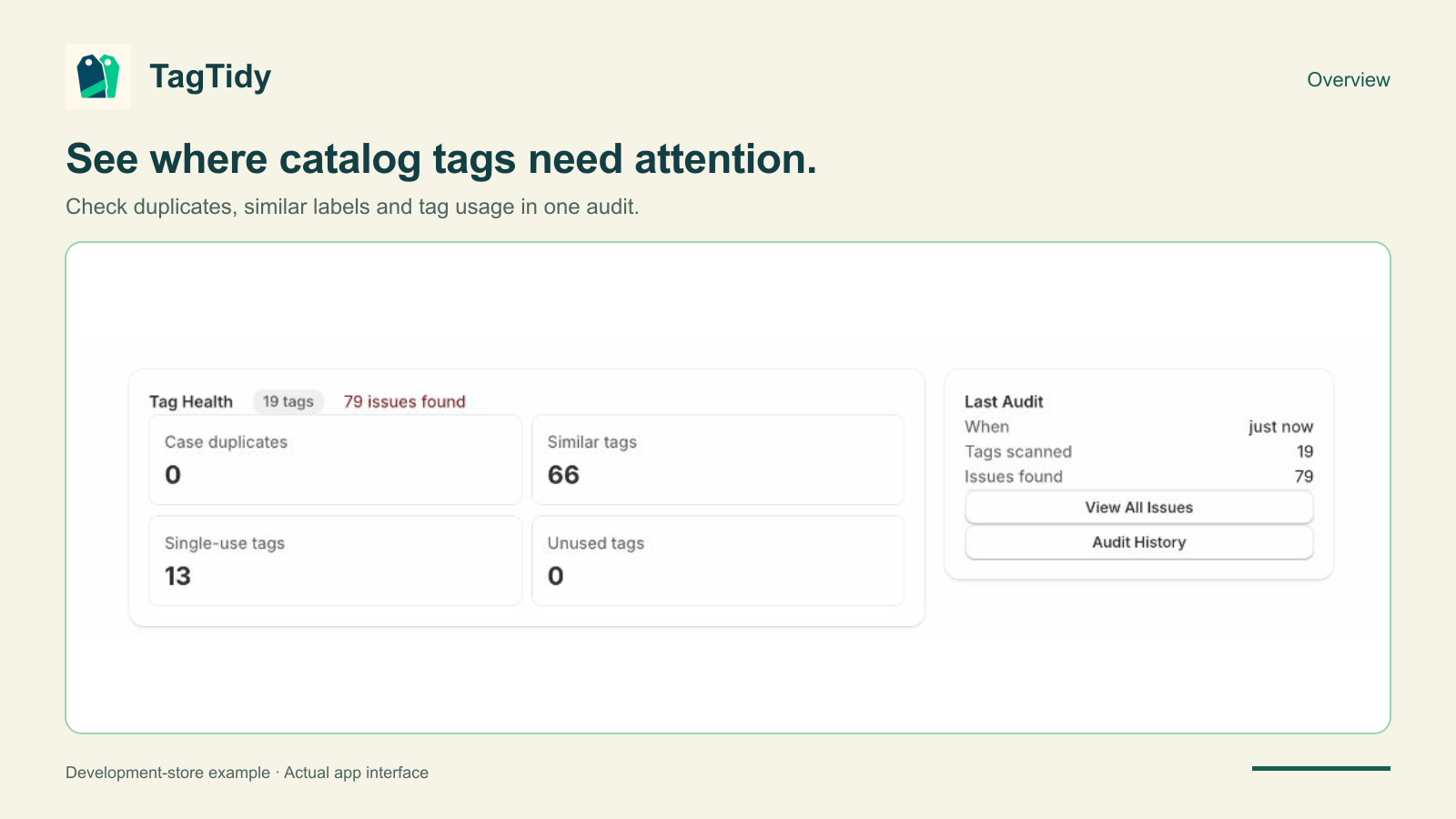
TagTidy dashboard showing tag health and categorized findings in Shopify admin
Real development-store capture, October 15, 2026. Example findings describe that store, not a promised result for your catalog. View full-size screenshot.

What TagTidy helps you do

For merchants untangling tags after imports, seasonal campaigns, or years of catalog edits. Keep useful labels and review the rest.

Find labels that deserve a closer look

Review case variants, near matches, single-use tags, and unused-tag findings in one audit. A finding is a review prompt: a tag used once may still have an important job.

Review products before changing tags

Open a finding to understand its tag values and affected products. Choose a canonical name when a merge is appropriate, or leave an intentional difference alone.

Apply the cleanup you choose

Confirm a merge, rename, or removal from the app. Audit history lets you revisit completed checks; it is not a one-click rollback of product changes.

From the first check to the next step

A workflow inside Shopify admin, with decisions you can review.

  1. Run a tag audit

    Check the catalog's product tags and open a category of findings. Review the audit result before deciding what needs attention.

  2. Check the meaning and dependencies

    Look at the products using a tag. Check collections, filters, Shopify Flow, and connected apps before changing a value they might rely on.

  3. Confirm a small, deliberate cleanup

    Choose the action, review it, and confirm. Check the relevant storefront behavior and run another audit after Shopify saves the changes.

Know the scope before you start

Choose the app for what it does today.

  • TagTidy works with product tags. It is not a cleanup tool for customer tags, orders, or duplicate products.
  • Tag changes are live Shopify updates. TagTidy does not provide an automatic undo for a confirmed merge or removal.
  • Audits are run on demand and have Shopify API and pagination limits. They are not continuous monitoring or a guarantee that every large catalog is fully checked.
  • The app identifies possible cleanup opportunities. It cannot decide whether a tag is required by your store's business rules.

Practical Shopify guides

Understand the problem, work through an example, and choose your next step.

Questions before you install

Capabilities, changes to your store, and billing.

Does TagTidy change tags as soon as I install it?

No. Run an audit, review the findings, and confirm a merge, rename, or removal when you choose to make a change.

Should I delete every single-use tag?

No. A tag on one product may drive a collection, an internal workflow, or an intentional product label. Review its purpose and dependencies first.

Can I undo a merge?

There is no automatic rollback in TagTidy. Keep a record of the original product-to-tag assignments and review the proposed change before confirming it.

Will tag cleanup improve Google rankings?

TagTidy is a catalog-maintenance tool. Consistent tags can make store operations easier, but cleaning tags is not a promise of higher Google rankings.

Where do I manage billing?

Shopify handles the subscription. Review the plan and trial on the App Store listing and manage the installed app through Shopify admin.

Availability and pricing

The public listing shows $3.99 USD per month, or $45 USD per year, with a 7-day free trial. Confirm the current price and billing terms on Shopify before subscribing.

Available on the Shopify App Store.

Availability checked November 2, 2026. Contact support for current access questions.

View on Shopify App Store

Already using TagTidy?

Open the app from Shopify admin, or enter your store domain to continue to Shopify sign-in.

Shopify handles authentication. Do not enter a password here.